Know which calls
turn into customers.
Ringlane is the calling workspace for B2B sales teams. Your callers work from one simple screen with the script and arguments at hand. You see in plain numbers how many calls a meeting takes, where conversations get stuck and who needs help.


Real screens from the Ringlane app with demo data. No affiliation with the companies shown.
Built for the whole sales team
See what your sales effort brings in.
Calls, conversations, meetings and the conversion between each step, for the whole team, without asking anyone for a spreadsheet.
Coach on facts, not feelings.
Compare callers fairly, see where each one gets stuck, and read why prospects say no.
One screen. Less admin.
The script and arguments next to the lead, one key to log the call, and the next step already planned.
Your team makes 100 calls. Where do they go?
Your team picks up the phone and works through a list.
Most people do not pick up the first time. That is normal.
Only some have time and are the right person to talk to.
A few say yes to a meeting.
And one becomes a customer.
Was it the list, the script, the follow-up or the caller? Without numbers, you are guessing. Ringlane writes every step down for you, so you see exactly where leads drop out and which step to fix.
Your sales, in plain numbers.
Every call your team logs becomes a number you can act on. No spreadsheets, no guessing.
One screen for the whole team
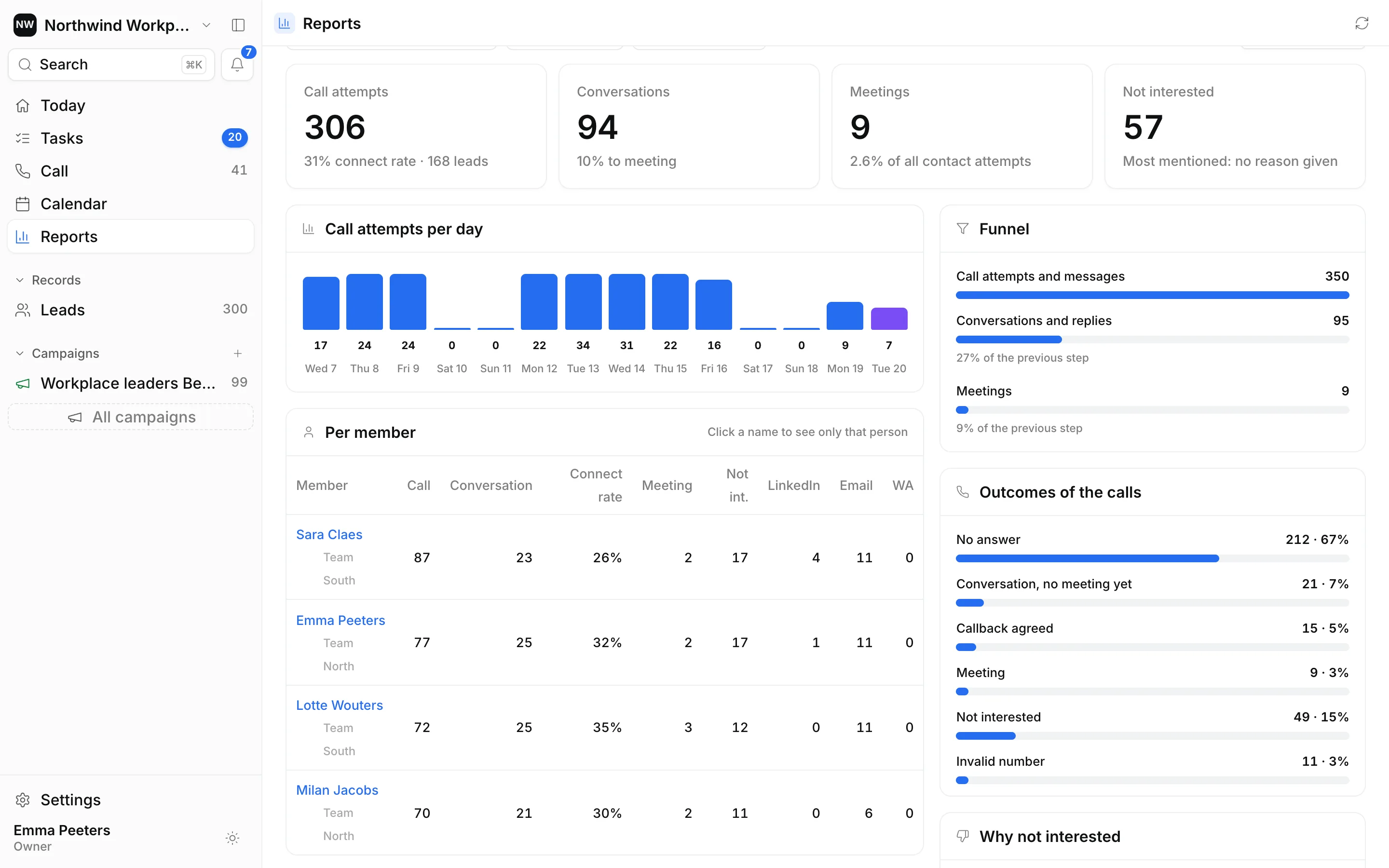
Pick a period, a campaign, a team or a person. The numbers update on the spot.
Calls, conversations, meetings
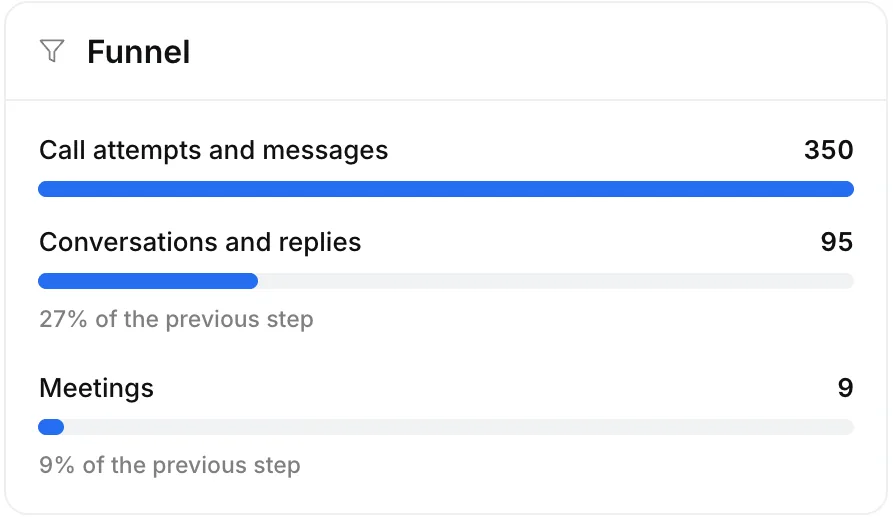
And the percentage between each step: how many calls reach someone, and how many conversations become a meeting.
See which step leaks
Reaching people, the conversation or the meeting: the funnel shows where most leads drop out.
Compare callers fairly
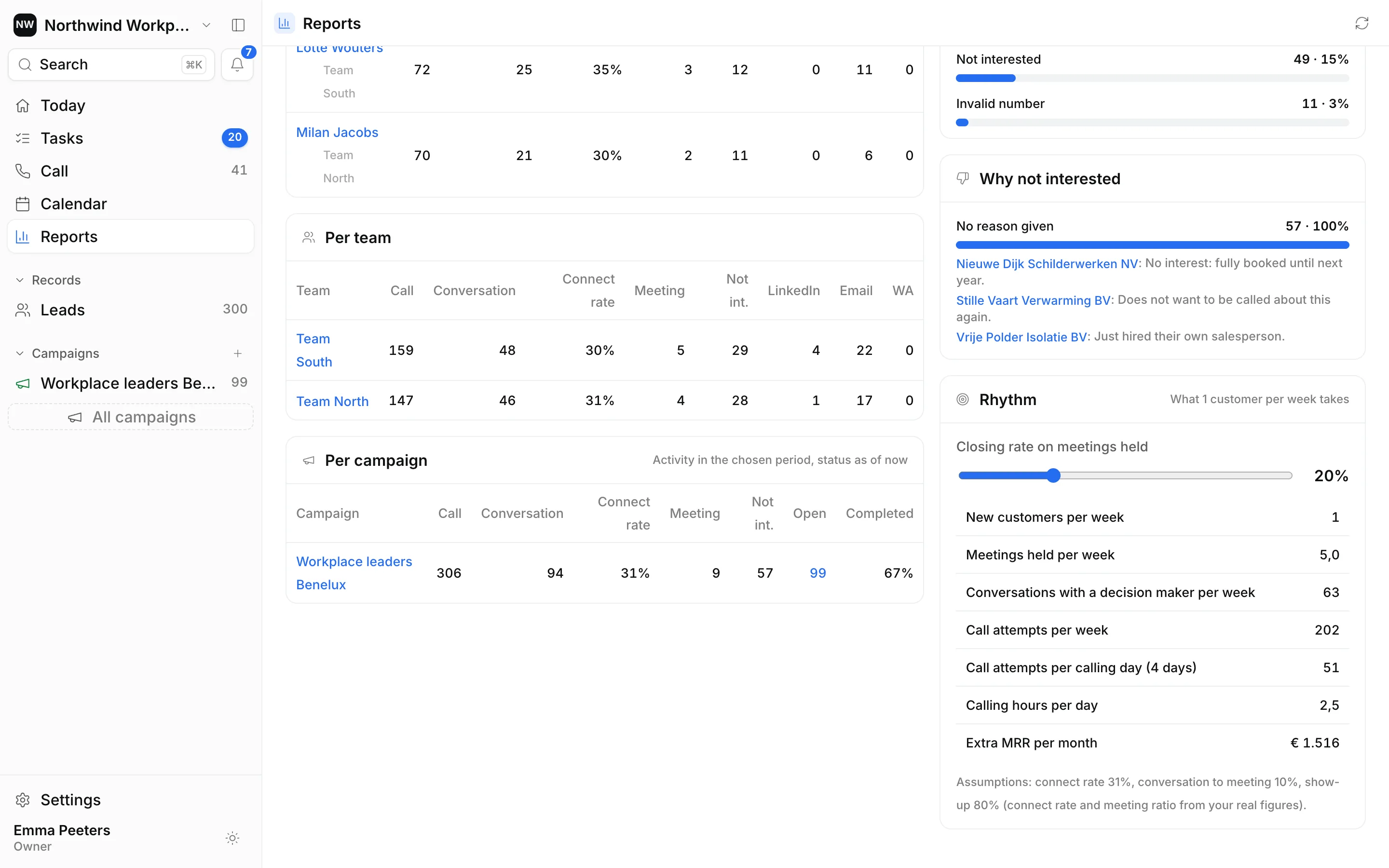
Calls, conversations, reach and meetings per person and per team. You see who needs help with what.
Read why prospects say no
Every "not interested" comes with a reason, so you can fix the pitch or the list.
Know what one new customer takes
Based on your own numbers, Ringlane calculates how many calls per week and per day it takes to win one new customer per week.
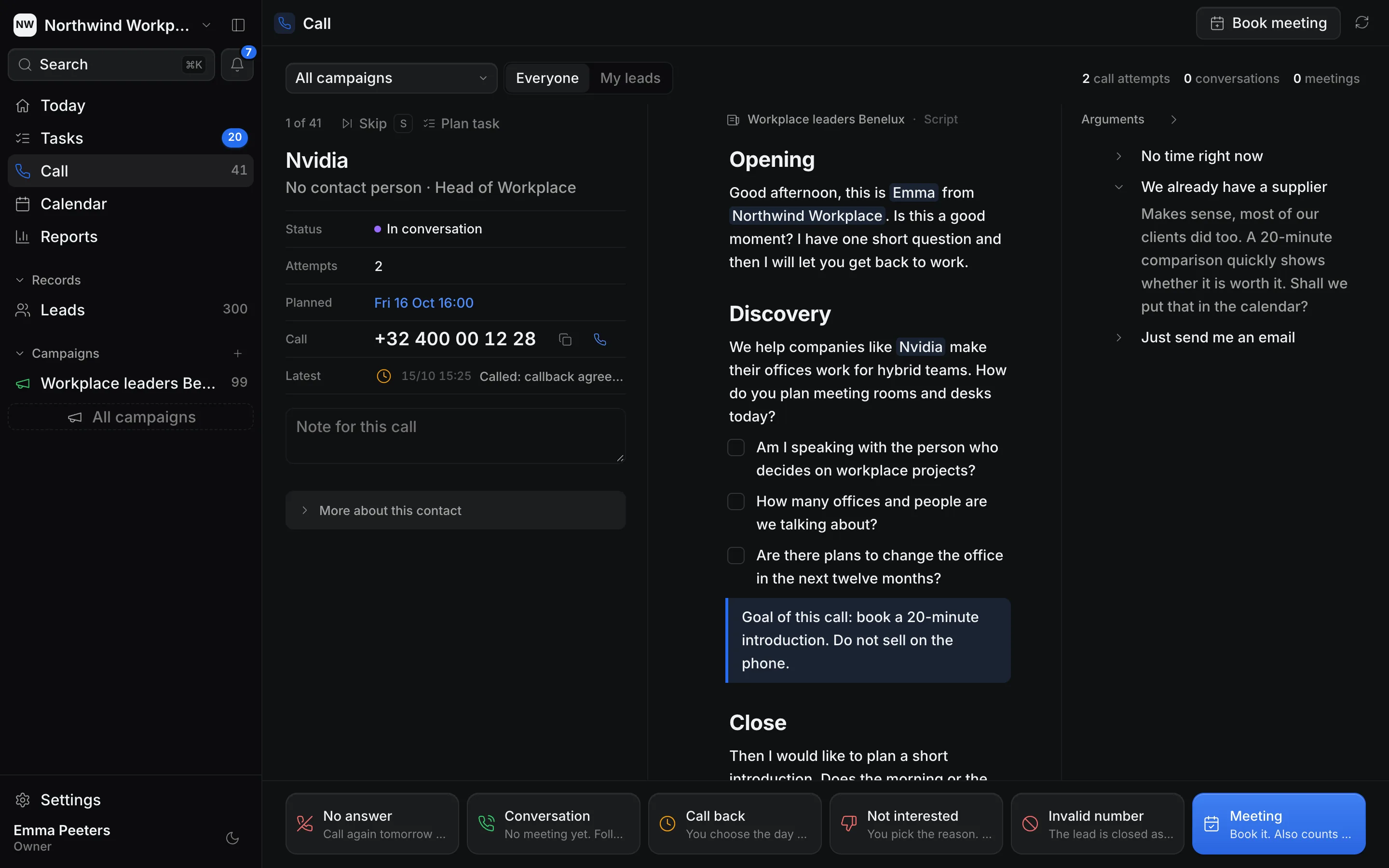
One simple screen for every call.
Everything the caller needs is on one screen. No tab switching, no searching.
Everything for the call, together
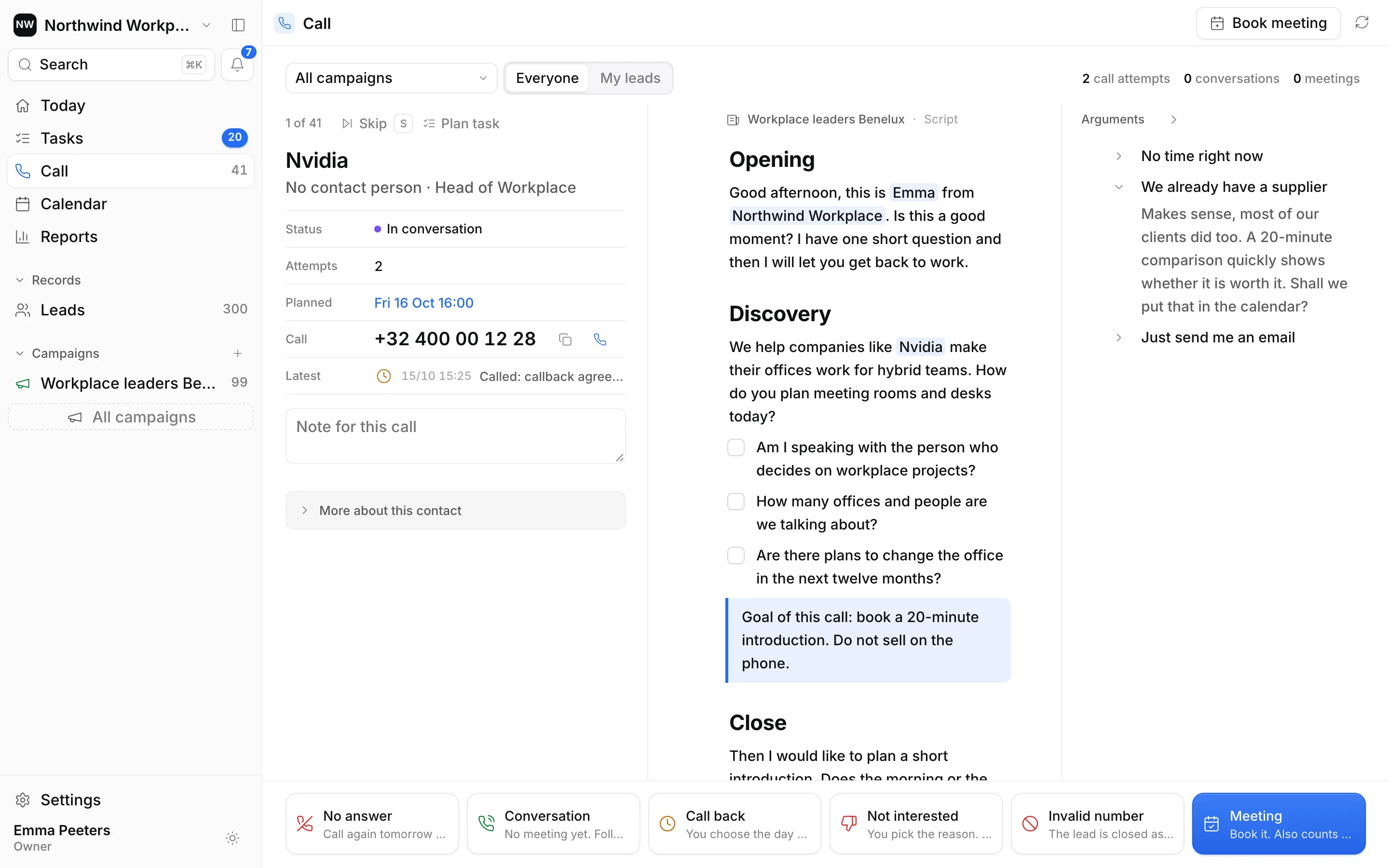
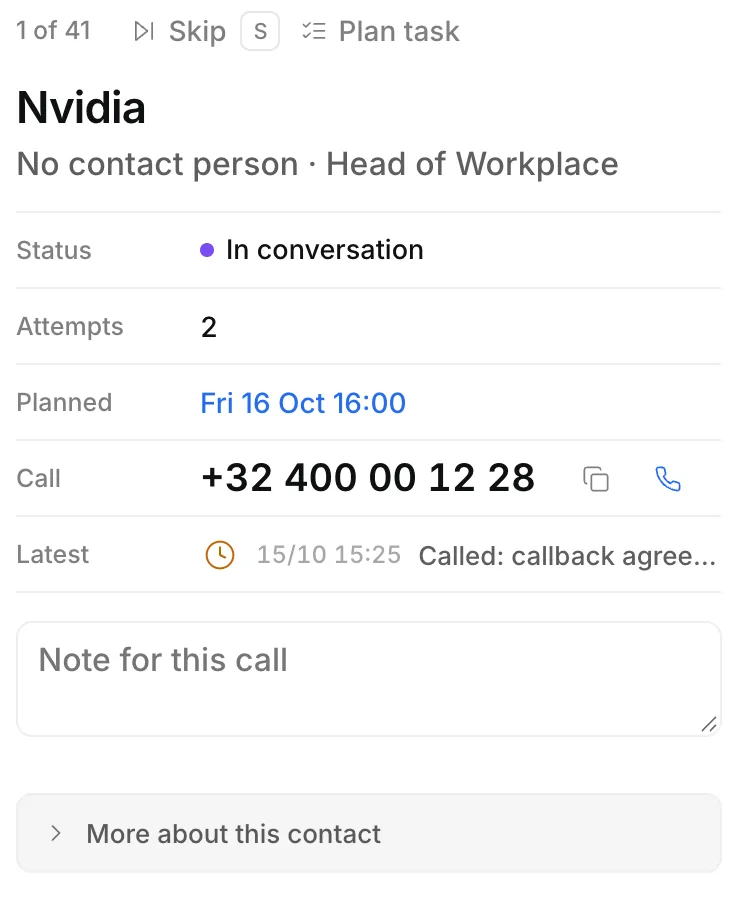
The lead on the left, the script in the middle and the arguments on the right.
Who you call and what happened before
Status, attempts, the planned follow-up and the last contact. Click the number to call from your own phone.
The script, already filled in
The company name and your own name are filled in. Tick off the questions as you go.
The right answer, one click away
Every objection has its answer ready in the panel on the right.
Log it with one key
No answer, conversation, call back, not interested, invalid number or meeting. Ringlane plans the next step for you.
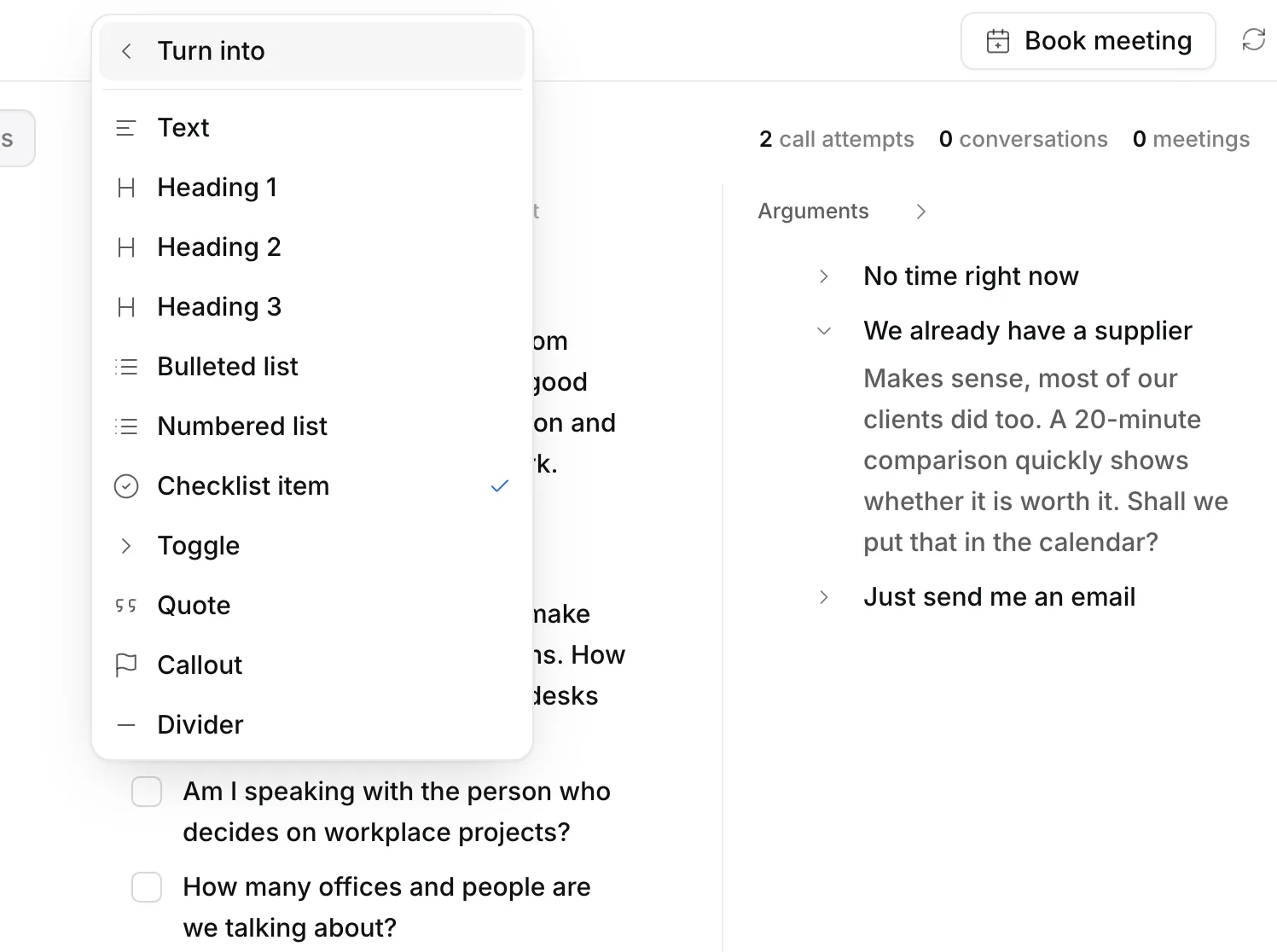
Build your script from blocks.
Headings, text, checklists, toggles for objections and callouts. Move blocks around, change their type, and every caller works with the latest version.
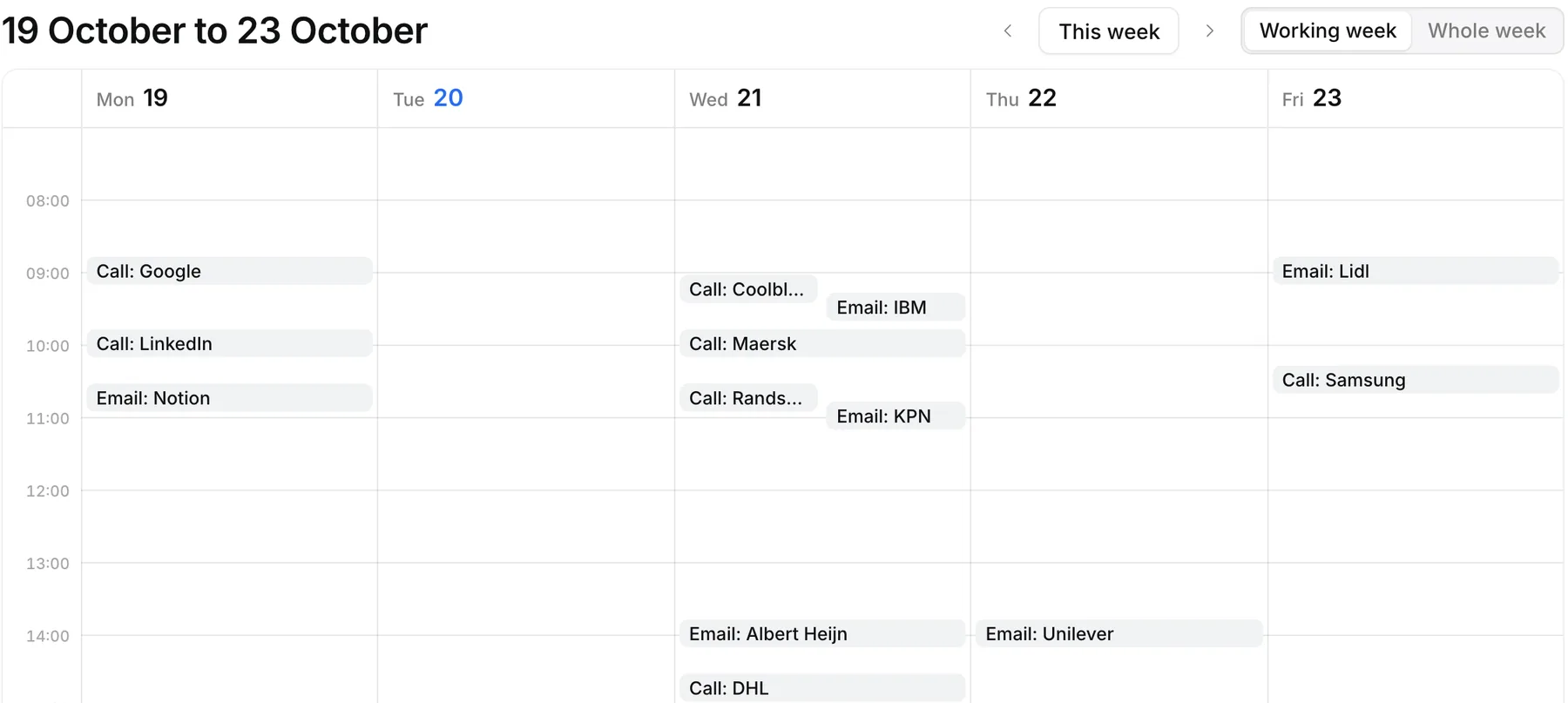
Nothing slips through the cracks.
After every call the next step is planned. Your week shows who to call or email and when, and the Today view puts overdue call-backs first.
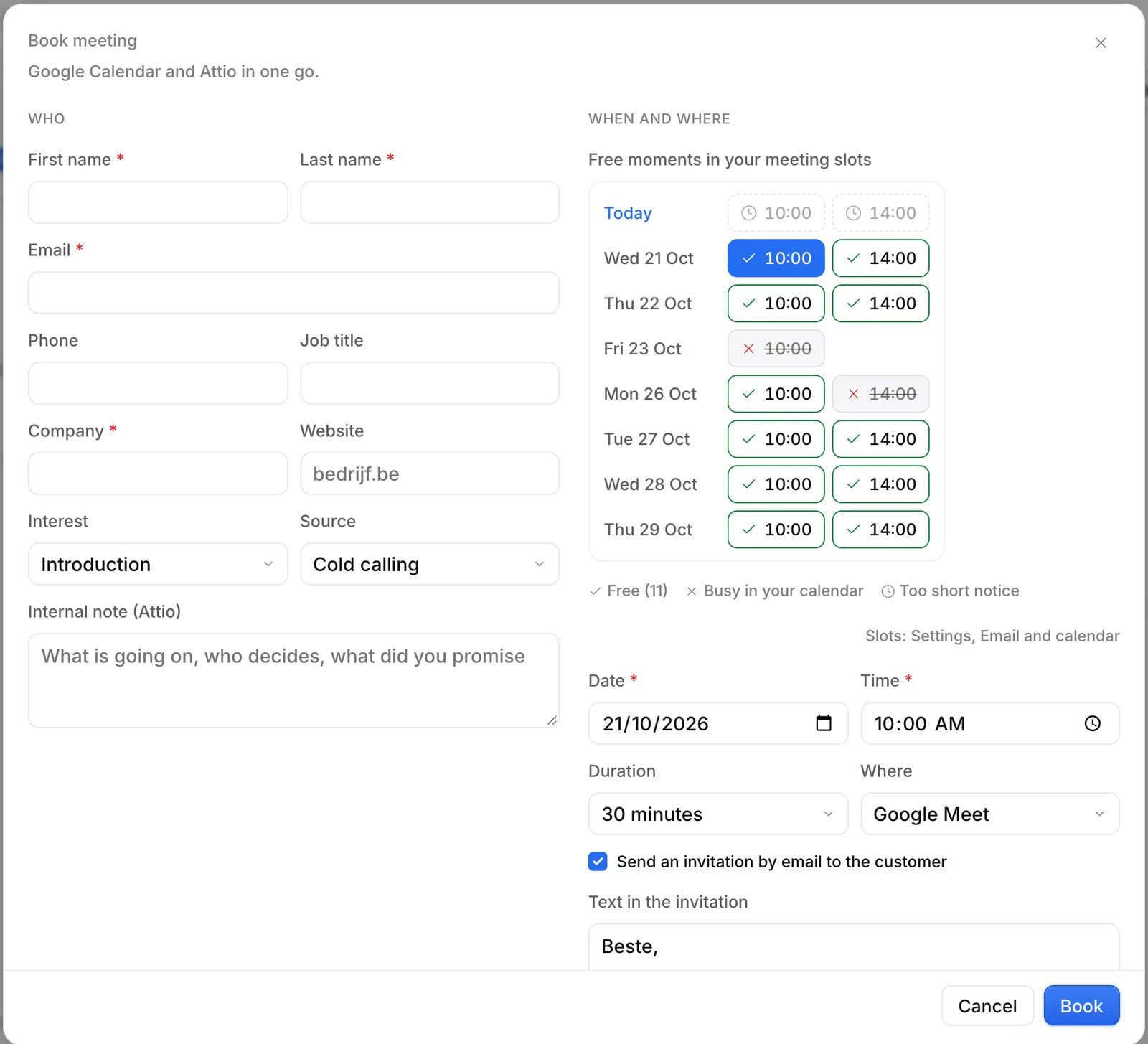
Book the meeting while they are on the line.
Ringlane shows your free moments in Google Calendar, adds a Google Meet link and sends the invitation. Booked meetings go to Attio.
All your leads in one clear list.
Import Excel, CSV or Bizzy exports. Every lead shows its status, last action and next task.
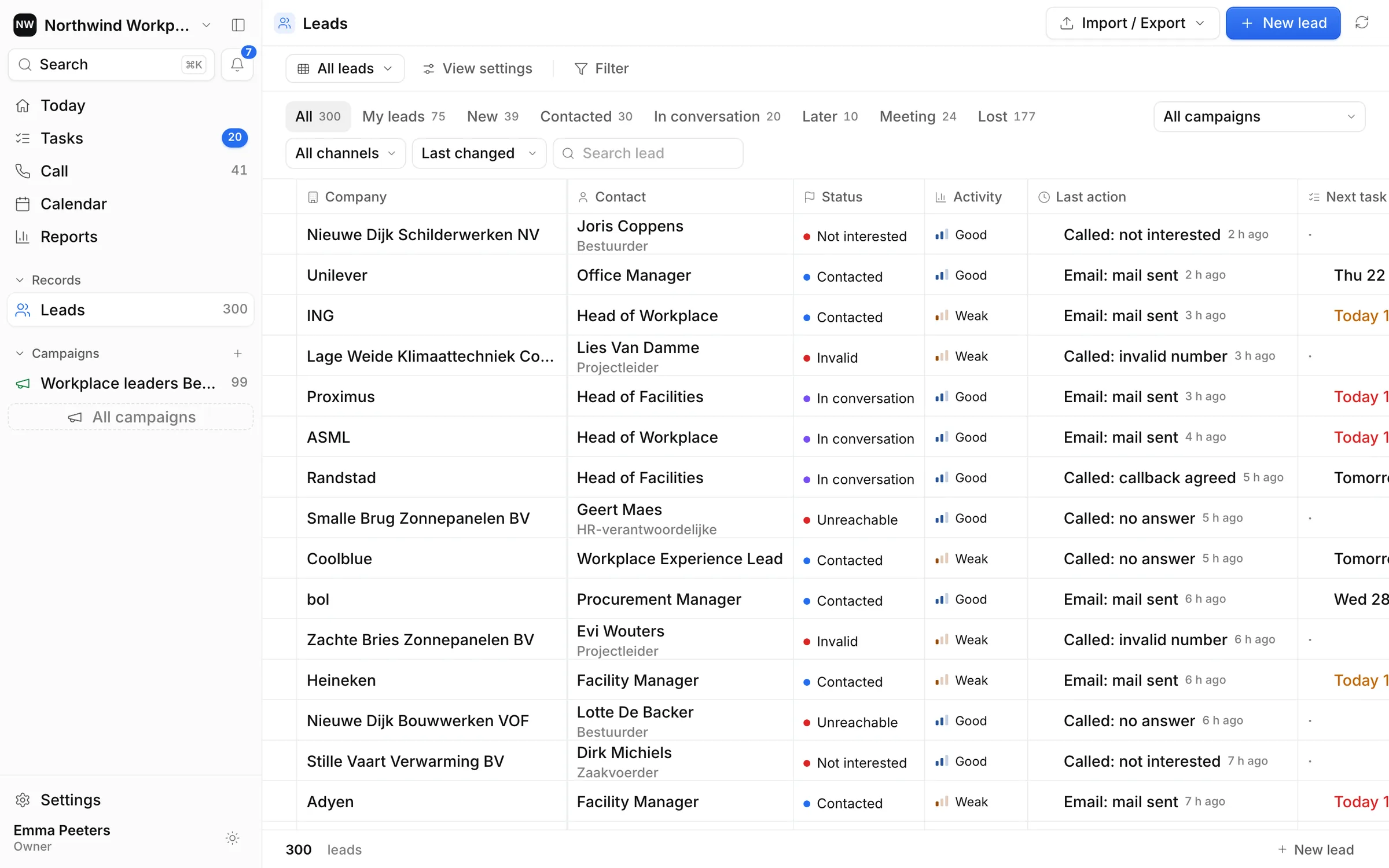
Real screens from the Ringlane app with demo data. No affiliation with the companies shown.
Not every lead picks up. Your follow-up does.
Mix calls with email, LinkedIn and WhatsApp. Every touch lands on the same timeline, and Ringlane tells you what is next.
Illustration of a cadence. LinkedIn and WhatsApp messages are sent by you and logged in Ringlane.
Use the phone you already have.
Ringlane is not a dialer, on purpose. Click the number to call from your mobile, desk phone or softphone, then log the outcome with one key.
- Keep your own number. No porting.
- No per-minute platform fees and no new telecom contract.
- Works with any softphone that opens phone links.
Your pipeline stays yours.
Ringlane was built with strict data separation from day one. Hosted in the EU, sealed per workspace and encrypted where it matters.
Hosted in the EU
Your data lives in Frankfurt, Germany. Server functions run there too.
Every workspace sealed
Row-level security in the database. Members only ever see their own workspace.
Encrypted connections
Google and Attio connection tokens are encrypted with AES-256-GCM. TLS everywhere.
Short sessions
Sessions are checked on every request and access tokens expire after 15 minutes.
No peeking
Our admin tools show accounts and workspaces, never your leads or notes.
GDPR built in
Data processing terms included. Export your leads or delete your account any time.
Read exactly what we process in our privacy policy and data processing terms.
Free while we are in beta.
Use every feature with your whole team, and help us shape what comes next.
Open beta
- All features: reports, scripts, follow-up and the Today view
- Google Calendar, Gmail and Attio connections
- Your whole team, with roles
- Up to 50,000 records per workspace
Our beta promise
- 130 days noticeBefore paid plans start, you hear from us at least 30 days in advance.
- 2You decideNothing is charged unless you choose a paid plan yourself.
- 3Your data, alwaysExport your leads whenever you want. No lock-in.
Honest about the beta
- No built-in dialer: you call with your own phone.
- No per-lead win prediction yet: you see conversion per step, per person and per campaign.
- LinkedIn and WhatsApp are logged by hand, never automated.
- Attio is the only CRM connection for now.
A note from the founder
Ringlane started as the outreach cockpit of our own lead generation team at Small Steps Big Impact. We wanted one place for the whole call: the list, the script, the outcome, the follow-up and the meeting, and numbers we could trust. Now we are opening it up to other B2B teams. Try it, and tell me what is missing. I read every message.
Questions, answered.
What is Ringlane?
Who is Ringlane for?
Which numbers does Ringlane show?
Does Ringlane dial the calls for me?
What do the N, G, T, A, X and O keys do?
What does Ringlane cost?
Which CRM does Ringlane work with?
Can I import my lead lists?
Where is my data stored, and is Ringlane GDPR compliant?
How does Ringlane use my Google data?
Is Ringlane available in Dutch?
How is Ringlane different from Aircall, Orum or lemlist?
Does Ringlane use AI?
AI in sales: what really helps a calling team today
AI in sales without the hype: where AI helps a B2B calling team today, where it fails, what the GDPR and EU AI Act ask, and a checklist to get started.
8 min readDataB2B lead lists and the GDPR: a practical guide for sales teams
B2B lead lists GDPR guide: where lists come from, legitimate interest and the balancing test, informing contacts, retention, opt-outs and a checklist.
9 min readSales managementCold calling KPIs: what to track and how to calculate each one
Cold calling KPIs for sales managers: connect rate, conversation-to-meeting rate, show rate and closing rate, with formulas, an example and what to fix.
8 min readEvery call.
One lane.
Start the free beta today. Google sign-in, no credit card, hosted in the EU.